
Have you ever wrapped up a post, hit publish, and then immediately remembered the pile of cleanup waiting for you-resize images, write a meta description, fix internal links, double-check schema, preview social cards, and hope Google’s first crawl doesn’t catch you mid-mess?
That little moment of dread is exactly where blog and SEO workflows tend to crack. The tasks are repetitive, but the consequences aren’t. A sloppy template update, a forgotten redirect, or one plugin that bloats page speed can quietly erode trust-both with readers and with search engines.
So yes, people talk about blog and SEO automation all the time (including building a repeatable AI blog automation pipeline). And just as often, teams hesitate. Automate too aggressively and everything starts to feel like it came from the same cookie-cutter. Automate nothing and you stall out-publishing slows, the backlog grows, and your best ideas sit in drafts for weeks.
Here’s the middle path: let WordPress handle the boring, verifiable details, and keep humans in charge of taste, judgment, and meaning (a practical AI vs human workflow helps make that line clear). We’re not trying to replace editorial thinking. We’re trying to make the right defaults happen-even on the weeks when everyone’s running on fumes.
Let’s walk through what to automate, what to standardize, what to keep manual, and what to do when (not if) something goes sideways.
Why Automate Your WordPress Blog and SEO Workflow (Without Losing Quality)
Automation gets a bad reputation because people picture a content factory churning out bland pages. But good automation doesn’t write for you. It acts more like guardrails on a mountain road: you still steer, but it’s harder to drift into trouble.
In WordPress, the sweet spot is automating tasks that happen constantly and are easy to audit. Formatting rules. Image compression. Schema defaults. Routing drafts to the right reviewer. These are exactly the places editors and marketers lose hours-especially once you scale beyond a couple posts a month.
And let’s be honest: quality doesn’t come from manually checking every box. Quality comes from spending human attention where it actually matters. Writers should be focused on the reader’s question, the examples that make the answer memorable, and the structure that makes the post easy to follow. Strategists should be thinking about topical coverage and where internal links should lead. If your best people are burning energy on renaming image files and copying templates, the work gets dull fast-and dull work leads to mistakes.
A quick micro-story from the trenches: a two-person content team at a B2B SaaS company I worked with was publishing twice a month, not because they lacked ideas, but because every post ended in a last-mile scramble. They automated image handling, standardized briefs, and added pre-publish checks. Output jumped to six posts a month without hiring. Three months later, organic sessions were up 38%, and time-to-publish dropped from ten days to six. No magic. Just fewer bottlenecks, fewer forgotten steps, and a calmer process.
WordPress SEO and Blog Optimization Strategies That Scale with Automation
Scaling a WordPress blog isn’t really about producing more words. It’s about reducing variance. When every post is a one-off snowflake, your workflow stays fragile. When your core decisions are baked into architecture, taxonomy, and templates, improvements compound-and that’s also the core of a scalable content strategy.
At the strategy level, Blog SEO is about clarity: making it easy for users (and crawlers) to understand what your site covers, how topics connect, and which pages matter most. At the execution level, automation helps you apply that strategy consistently-even when you have multiple authors, a busy editor, and a calendar that won’t stop moving.
Architecture, taxonomy, and templates that compound
Start with structure. Structure is where future-you either says thank you-or regrets everything.
Categories, tags, custom post types, and URL patterns aren’t just WordPress settings. They’re the skeleton your content rests on. A scalable approach usually includes a small set of categories aligned to your primary topics, with tags used sparingly for recurring subthemes.
The win isn’t more taxonomy. The win is taxonomy you can trust.
Templates do the same compounding work. A consistent layout for how-to posts, case studies, and comparisons makes content easier to scan. It also makes automation safer, because you can reliably target known blocks and fields when generating schema, table of contents sections, or related-post modules.
If you need a north star, Google’s documentation on crawlable architecture and quality signals is worth revisiting-even if you’ve been doing this for years: Google Search Central documentation.
Editorial standards, briefs, and reusable components
Automation works best when it’s automating something real-a clear, written standard that your team actually agrees on.
That standard should live in your briefs, your checklists, and your reusable blocks.
For example, if every post should include one clear ‘who this is for’ statement near the top, you can enforce that in your editorial review and bake it into your templates. If you write about jargon-heavy topics, you might standardize a short glossary block and drop it in where it helps.
Reusable components also reduce subtle inconsistency. The same callout style, comparison table formatting, author bio pattern, and citation formatting can be standardized. Writers still write. They just don’t rebuild the page from scratch every time.
To make this concrete, here’s a quick map of what tends to scale well when automated, and what should stay human-owned:
| Workflow area | What to automate | What to keep manual | Why it matters |
|---|---|---|---|
| Site structure | Default breadcrumbs, canonical rules, sitemap generation | Category strategy and when to create new clusters | You want consistency, not taxonomy sprawl |
| Content production | Brief templates, content blocks, outline scaffolds | Voice, examples, original insights | Readers can tell when you cut corners |
| On page checks | Title length alerts, missing alt text checks | Final editorial read and intent match | Automation catches errors, humans catch meaning |
| Technical hygiene | Image compression, caching, redirects patterns | Migration plans and risk review | Automation without oversight can create sitewide issues |
Designing an Automatic Publishing Workflow in WordPress
A publishing workflow is basically a promise: every post goes through the same essential steps, in the same order, with clear ownership.
Automation makes that promise easier to keep-especially when multiple people touch the same draft. And when you’re trying to align blog and SEO efforts, consistency is half the battle.
In WordPress, you can design your workflow using roles and capabilities, editorial plugins, staging environments, and a clean path from draft to scheduled to published. The best workflows aren’t complicated. They’re explicit.
Roles, handoffs, and approvals across your pipeline
Bottlenecks usually show up where responsibility is fuzzy. Everyone assumes someone else is doing the ‘final check,’ and then something small ships… until it isn’t small.
- Writer creates draft, adds sources, and fills required fields like featured image and excerpt.
- Editor reviews structure, clarity, and whether the post answers the search intent.
- SEO reviewer checks internal links, metadata, and whether the post fits the topical plan.
- Publisher runs final QA and schedules the post, including social preview checks.
- Analyst monitors early performance signals and logs updates for the next revision.
One punchy rule that saves time: if a step has no owner, it doesn’t exist.

Safe scheduling: cron, staging, and rollback paths
Scheduling is where automation can either feel magical-or turn into chaos.
WordPress uses WP-Cron for scheduled actions, but WP-Cron depends on site traffic to trigger events. On low-traffic sites, scheduled posts can miss their window, which is a frustrating way to start your day.
A safer setup is to configure a real server cron job to call wp-cron on a schedule, or use a managed host that handles it for you. Some teams also route scheduled publishing through a staging environment and then deploy at a known time, which is common on higher-risk sites where one broken template can affect hundreds of pages.
Rollback matters just as much as scheduling. If an automation rule inserts the wrong canonical tag across a template, you need a fast escape hatch. In practice, that means version-controlled theme files, a clear plugin update policy, and a short checklist for what to disable first during an incident.
For teams who want an SEO refresher from the source, this introductory video from Google is a solid baseline to align the group before you formalize your pipeline:
On-Page SEO for WordPress Posts: Automate the Details, Protect the Craft
On-page work is where automation really earns its keep, because so much of it is repetitive and measurable. But here’s the trap: thinking on-page optimization is only a checklist.
The checklist helps. The craft is what makes someone stay.
A strong blog and SEO approach treats automation like a safety net. It catches missing fields, enforces formatting, and keeps performance stable. Meanwhile, the writer and editor make the page worth reading. Ask yourself: if a reader landed here from search and never visited another page, would they feel helped-or hustled?
Titles, metadata, schema, and media automation
You can automate a surprising amount of metadata without making your site feel robotic.
A common pattern is to define title formulas for certain content types, then allow manual override for high-value posts. For example, a case study template might generate a default title and meta description from custom fields like company name, industry, and outcome. That keeps drafts consistent and reduces the chance that ‘TBD’ sneaks into production.
Schema works similarly. You can set sitewide defaults for Organization, breadcrumbs, and Article markup, then extend with FAQ or HowTo schema when it genuinely fits. Plugins can help, but editorial judgment still matters-structured data should reflect what the reader can actually see on the page.
If you’re evaluating your stack, this roundup of AI SEO tools for real teams can help you separate what’s useful from what’s just noise.
If you want a widely used plugin that covers titles, schema defaults, and content analysis, Yoast SEO is a common starting point for WordPress teams.
Here is a practical breakdown of what to automate versus what to personally review before publishing:
| Element | Safe to automate | Manual review recommended | Notes |
|---|---|---|---|
| Title tag | Defaults from templates | Final phrasing for clarity and intent | Humans write better hooks |
| Meta description | Draft from excerpt or key points | Any page targeting a competitive query | Avoid keyword stuffing |
| Open Graph | Auto pull title, image, description | Social copy for launches | Social audiences behave differently |
| Schema | Breadcrumbs and Article defaults | FAQ and HowTo accuracy | Keep it consistent with on page content |
| Media | Alt text prompts, image naming rules | Featured image choice and relevance | Images carry meaning, not just decoration |
Performance, images, and Core Web Vitals at scale
Performance is where ‘small’ automation pays you back for months.
If every author uploads five-megabyte images, it doesn’t matter how good your writing is-your site will feel heavy. Readers bounce. Editors get blamed. Everyone loses.
Automate image compression on upload, set sensible maximum dimensions, and serve modern formats when possible. Pair that with caching and a lightweight theme, and you remove a huge source of day-to-day variance.
Core Web Vitals are worth taking seriously because they tell a real user experience story, not just a score. If you want a clear explanation of what matters and why, web.dev’s overview is excellent: Core Web Vitals on web.dev.
One more reality check: speed optimizations aren’t ‘set and forget.’ A plugin update can add scripts. A new block can ship heavier CSS. Automation keeps your baseline strong, but you still need monitoring so you notice when things drift.
Internal Linking Strategy for WordPress Blogs That Boosts Topical Authority
Internal links are the quiet infrastructure of SEO-friendly blogging. They help users discover related content, and they help search engines understand which pages you consider important. If you only add internal links when you remember, your site grows like a city without street signs.
The goal is to create predictable pathways. Some links should be contextual and written by a human. Others can be systematic and rules-based. The trick is knowing which is which-because over-automation here can get awkward fast.
Pillar-cluster architecture and link rules
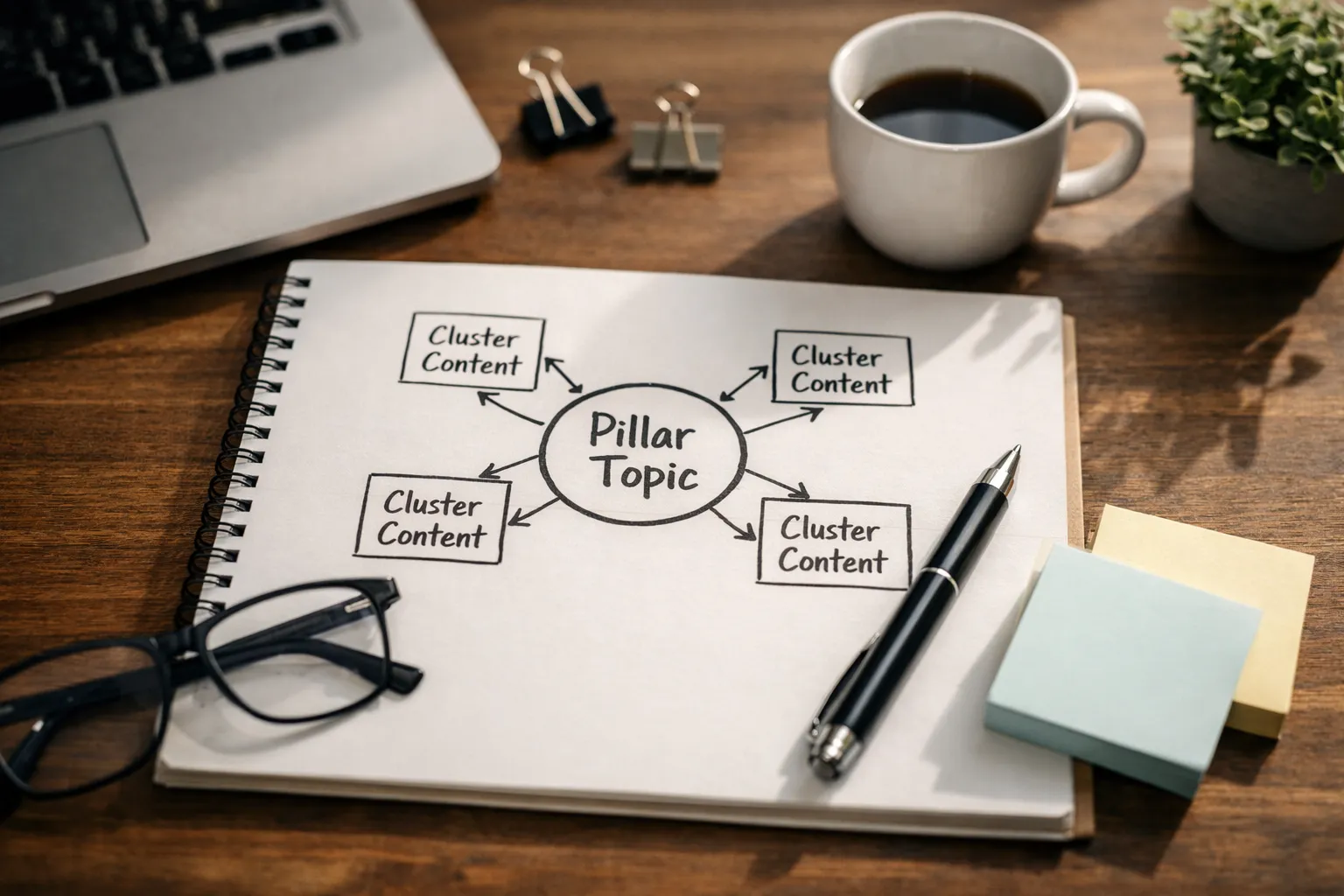
A pillar page acts like a hub for a topic. Cluster posts cover subtopics and point back to the pillar. Over time, you build a network that signals depth.
In WordPress terms, you can support this architecture with consistent categories, parent-child pages where appropriate, and a related resources section driven by tags or custom fields.
Link rules keep things sane. For example, you might decide that every cluster post links back to its pillar within the first third of the article, that you add two to four contextual links to sibling posts only when they truly help the reader, and that you update the pillar quarterly to include new clusters.
That isn’t about gaming anything. It’s about building a library where shelves are labeled-and where readers don’t have to work to find the next useful chapter.
Semi-automated linking with plugins and scripts
Semi-automation is often the sweet spot. Full automation can produce clumsy links. No automation leaves easy wins on the table.
One approach is to maintain a small link dictionary of preferred anchor phrases and destination URLs, then have a script suggest placements in drafts for an editor to approve. Another is to use plugins that surface internal link suggestions in the editor without automatically inserting them.
A helpful mental model: automation should propose, humans should approve. That’s how blog and SEO work stays both consistent and readable.
The best internal links read like a considerate friend saying, ‘If you are curious about that, you will probably like this too.’
SEO Best Practices for WordPress Blogging: Guardrails, Monitoring, Recovery
Automation reduces routine work, but it can also amplify mistakes if you don’t wrap it in guardrails. That’s why scalable blog and SEO operations always include QA loops, monitoring, and a calm recovery plan.
Think of it like a kitchen. A faster oven is great, but you still need timers, thermometers, and someone who knows what done looks like.
Pre-publish and post-publish QA loops
Pre-publish checks catch issues before they become expensive. Post-publish checks catch drift.
The simplest scalable approach is to define a minimum viable QA that every post must pass, plus a deeper QA reserved for important pages. Minimum viable QA should be fast enough that it actually happens, even when you’re pushing to hit a deadline.
Common pre-publish checks include indexability, canonical correctness, a title and meta present, clean H2 structure, compressed images, and a handful of meaningful internal links.
Post-publish, schedule a quick review after one week to verify the page is indexed and rendering correctly, and again after one month to evaluate early engagement. Is the page matching the query intent you expected? Are people scrolling, clicking, and sticking around-or bouncing after ten seconds?
Metrics, alerts, and incident response
Monitoring is where automation becomes protective rather than risky. You don’t need a complex observability stack, but you do need signals-and you need them early.
- Indexing: watch for sudden drops in indexed pages or spikes in excluded pages.
- Performance: track Core Web Vitals and page speed trends after theme and plugin updates.
- Visibility: monitor impressions and clicks in Google Search Console for key directories.
- Errors: get alerts for 404 increases, redirect loops, and server downtime.
- Content changes: log template edits and automation rule changes like you would log deployments.
When something breaks, speed matters-but clarity matters more. Define an incident path: who investigates, who communicates, what gets rolled back first, and how you confirm the fix. Here’s a question worth asking before you need it: if a template change silently harms 200 posts, would you notice this afternoon-or next month?
If you build plugins or custom automation, it helps to follow WordPress’s own best practices for maintainability and security: WordPress Plugin Developer Handbook.
Conclusion and FAQ for Blog and SEO Automation in WordPress
The point of automation isn’t to publish more just to say you did. It’s to publish with fewer mistakes, less stress, and more consistency.
When the system carries the repetitive load, your team gets its time back for research, storytelling, and meaningful updates-the things readers actually remember. That’s the real payoff of blog and SEO automation: calmer publishing and better work.
A practical rule to stay grounded: automate anything that is repeatable and easy to audit, and keep humans responsible for anything that requires taste, empathy, or judgment.
What are the safest ways to automate publishing in WordPress?
The safest automations are the ones that fail gracefully. Scheduling posts, generating sitemaps, compressing images, and applying template-based metadata are generally low risk when you have monitoring.
If you want extra safety, use a staging environment for major template changes, configure a real server cron instead of relying on WP-Cron traffic triggers, and keep a rollback plan. Also, limit who can publish. A small permission change can prevent a big accident.
How do I keep content quality high when automating SEO tasks?
Treat automation as an assistant, not an author. Use it to enforce editorial standards, catch missing fields, and keep performance stable. Then protect quality with human reviews focused on usefulness: does the post answer the question, show evidence, and provide a clear next step?
If you only remember one thing, make it this: automate the mechanics, not the meaning-and your blog and SEO work will scale without losing its voice.